Redact Medical Records for HIM: Verify Paste/Search and 10% Sampling
Use HIPAA first steps for HIM staff to remove identifiers, sanitize metadata, run paste and search checks, sample 10%, and vet cloud vendors.

Redact Medical Records for HIM: Verify Paste/Search and 10% Sampling
Redaction is appropriate almost any time a medical record leaves your organization for a purpose other than treatment, payment, or your own operations. The one rule that matters most: removal has to be permanent, metadata has to be sanitized, and every redacted file has to pass a verification check before it goes out the door. HIPAA’s minimum necessary standard, Safe Harbor de-identification, and your organization’s disclosure log are your three anchors. Run the checklist below before you hit send.
TL;DR:
- All personal identifiers, including names, dates, locations, and biometric data, must be removed from records before sharing outside treatment, payment, or operations.
- Automated detection tools should be complemented with manual review to catch embedded free-text identifiers, especially in headers, footers, and scanned images.
- Use Safe Harbor for routine disclosures by stripping all 18 identifier categories or Expert Determination for datasets requiring retained diagnostic or geographic detail.
- Verify redactions through tests like copy-paste, search, and metadata inspection to prevent residual un-redacted information from being accessible.
- A unified platform that manages redaction, secure storage, access controls, and audit logging enhances process defensibility and reduces compliance risks.
Table of Contents
- Quick Checklist: What to Remove Before Sharing a Medical Record
- When Is Redaction Required, Allowed, or Unnecessary?
- Step-by-Step Redaction Workflow for EHR and Scanned Records
- Technical Pitfalls and Verification Best Practices
- Choosing a Redaction Workflow: Local Tools vs. Cloud Vendors
- How a Records Platform Fits Into a Defensible Redaction Process
- Team View: Practical Priorities for HIM Staff Doing Redaction
- An Alternative: Centralizing Redaction and Sharing on One Platform
- Sources
Quick Checklist: What to Remove Before Sharing a Medical Record
Every record you release outside treatment, payment, or operations needs a screening pass against the HIPAA Safe Harbor identifier list. HHS defines 18 categories of identifiers that qualify a record as de-identified once they’re gone, and the de-identification guidance is worth bookmarking if you handle disclosures regularly.
Here’s what to scan for on every export:
- Names — patient, relatives, employers, even the referring physician if not required by the request
- Geographic details smaller than a state — street address, city, and zip codes beyond the first three digits
- Dates tied directly to the individual — birth date, admission date, discharge date (age over 89 also gets special handling)
- Phone and fax numbers
- Email addresses
- Social Security numbers
- Medical record numbers and health plan beneficiary numbers
- Account numbers
- Certificate or license numbers
- Vehicle identifiers and license plates
- Device identifiers and serial numbers
- URLs and IP addresses
- Biometric identifiers — fingerprints, voiceprints
- Full-face photos and comparable images
- Any other unique identifying number, characteristic, or code
Most HIM staff catch the obvious ones in the body text. They miss the identifiers hiding in headers, footers, embedded PDF metadata, OCR text layers laid over scanned images, thumbnail previews, and barcodes or QR codes that encode a medical record number in machine-readable form. A referral packet usually needs lighter redaction than a subpoena response. A research export usually needs the full Safe Harbor treatment, or Expert Determination if identifiers must survive.
When Is Redaction Required, Allowed, or Unnecessary?
The minimum necessary rule governs almost every redaction decision you’ll make. It requires covered entities to limit protected health information to what’s reasonably needed for the specific purpose of a disclosure, and it applies whether the record is electronic, paper, or spoken. Treatment, payment, and health care operations are the major exception. Send a full chart to a specialist for active treatment, and you generally don’t need to redact anything. Send that same chart to a life insurance company, a research team, or opposing counsel, and minimum necessary kicks in hard.
Patients requesting their own records are a separate category entirely. Under HIPAA’s access right, patients are entitled to their full record with very narrow exceptions (psychotherapy notes and information compiled for legal proceedings are the main ones). You don’t redact a patient’s own information from that patient. Where redaction shows up here is protecting third-party information that happens to appear in the chart. Family history notes that name a relative, for example.
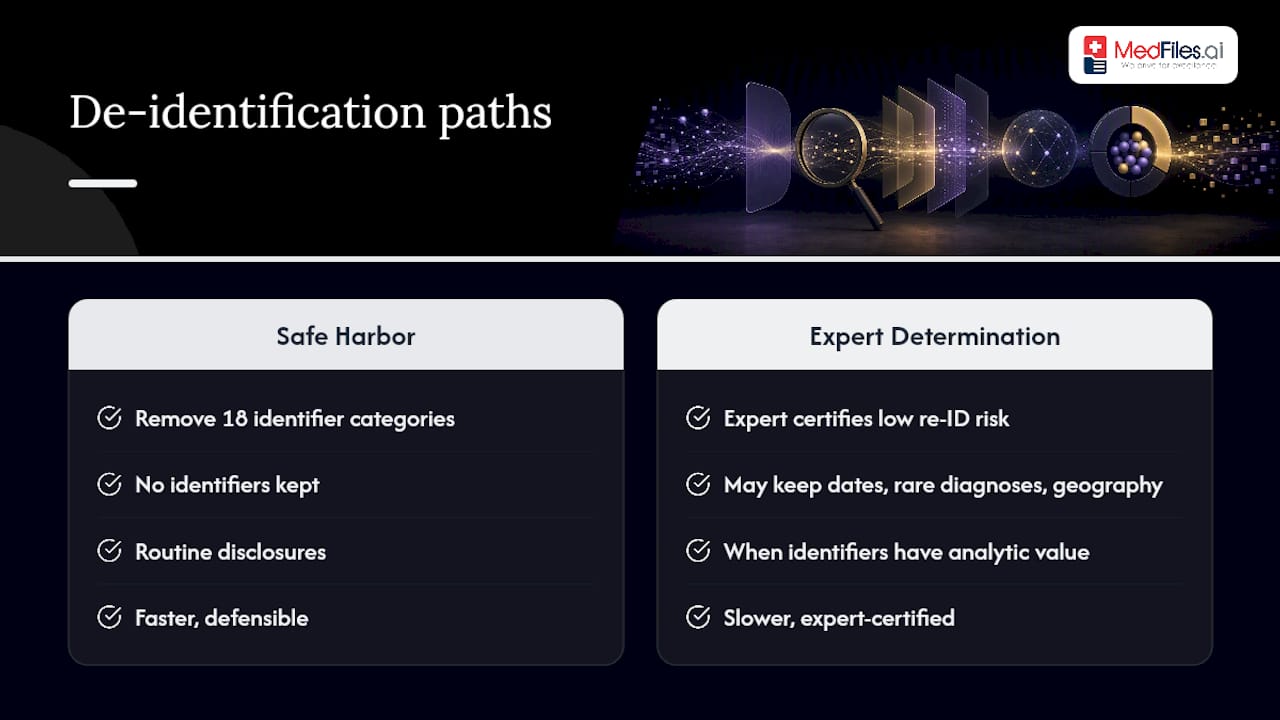
For de-identification of larger datasets, HHS recognizes two paths. Safe Harbor means stripping all 18 identifier categories, full stop. Expert Determination means a qualified statistical expert certifies that re-identification risk is very small, which lets a research team retain dates, rare diagnoses, or geographic detail that Safe Harbor would force them to strip. Expert Determination is the right call when identifiers carry analytical value. Safe Harbor is faster and defensible for routine disclosures.
Subpoenas and court orders often specify exactly what must be produced. Read the order closely. Redacting information a court explicitly demanded can trigger its own legal problem.
Two failure modes sit on either side of the right answer. Over-redact and you strip out clinical context a treating physician needs. A blacked-out medication list defeats the purpose of a referral. Under-redact and you’ve made a reportable disclosure, with breach notification obligations that follow.
Step-by-Step Redaction Workflow for EHR and Scanned Records
Every defensible redaction workflow runs through the same six stages, whether you’re processing a single chart or a research batch of five hundred. The operational sequence below mirrors what most HIM departments already run, tightened for consistency.
-
Confirm the legal basis and scope. Before you touch the record, pin down exactly why it’s being disclosed and to whom. A patient request, a subpoena, and a research protocol each authorize a different scope of release. Pull only the record subset the request actually covers. Exporting a full chart when only three lab reports were requested creates redaction work you didn’t need to do.
-
Decide on OCR. If the source is a scanned document with no existing text layer, you have two options: leave it as a flat image (safer, but not searchable) or run OCR to make it text-searchable before redacting. If you run OCR, redact after the text layer is generated, never before. Redacting a flat image and then running OCR on top of it will often recover the “removed” text.
-
Run automated PHI detection. Pattern-matching tools flag structured identifiers reliably: Social Security numbers, phone numbers, dates, medical record numbers, addresses. Auto-detection catches a large majority of what needs to be removed, though some depends on document quality and formatting consistency.
-
Conduct a manual clinical review pass. Automated tools miss free-text identifiers embedded in physician narrative. A name mentioned in a social history note. A relative’s diagnosis buried in a family history section. A nickname or an employer referenced in an intake form. This is the pass that actually requires a trained human, and it’s the one departments are most tempted to skip under deadline pressure. Don’t skip it.
-
Apply permanent redaction and flatten the document. Draw the redaction boxes, then apply and flatten, converting the marked areas into permanently removed content rather than an overlay sitting on top of retrievable text.
-
Sanitize metadata, then verify before you send. Strip Author, Creator, Producer, and custom XMP fields, along with any embedded thumbnails or revision history. Then run your verification checks (covered in detail in the next section) and log the disclosure with your privacy officer’s sign-off before release.
Pro Tip: If your department processes high volumes of releases, don’t verify every single page individually. Batch your exports by request type, then pull a random 10% sample from each batch for a full paste-and-search verification pass. If the sample turns up a miss, verify the entire batch by hand.
Technical Pitfalls and Verification Best Practices
The single most common redaction failure is trusting a black box that only covers the text visually. Drawing a rectangle over a name in a PDF viewer and exporting the file does nothing to the underlying text layer unless the software applies and flattens the redaction. Anyone who copies the “redacted” area and pastes it into a text editor gets the name back in plain text. OCR compounds this: a scanned image with an OCR text layer underneath can carry a full, searchable, un-redacted transcript of the page even after the visible image has been marked over.
Run these checks on every redacted document before release:
- The paste test — select the redacted area, copy it, and paste into a plain text editor to confirm nothing comes through
- Ctrl+F search — search the finished document for the patient’s name, date of birth, and MRN to confirm zero hits
- Text extraction — run the file through a text-extraction tool to catch anything a visual check would miss
- Metadata inspection — open document properties to confirm Author, Creator, and custom fields are scrubbed, per the redaction SOP used in clinical research settings
A few special cases trip up teams that otherwise run a tight process. Barcodes and QR codes frequently encode a medical record number in machine-readable form that a visual redaction of the printed number underneath won’t touch, and a barcode scanner will happily read right through it, according to the same operational guidance. DICOM images converted to standard formats can carry burned-in patient identifiers directly into the pixel data. Merged PDFs inherit metadata from every source file combined into them, so a document that passed verification before merging can fail after.
A recurring pattern in redaction failures: teams treat a visible black box as proof of removal, when automation plus a human review pass plus a verification step is the actual defense, according to the same PII Blackout guidance that outlines the standard workflow.
Choosing a Redaction Workflow: Local Tools vs. Cloud Vendors
Client-side and on-premise redaction tools keep PHI on your own infrastructure the entire time, which limits your risk surface but puts the full administrative burden on your staff. Cloud-based redaction services scale better for high volume and often include automated detection that speeds up the manual review pass, but they introduce a vendor relationship you have to manage carefully.
Uploading PHI to any cloud service creates a Business Associate relationship under HIPAA, and a signed Business Associate Agreement (BAA) is non-negotiable before that upload happens. A BAA does not eliminate risk on its own. It obligates the vendor contractually to protect the data and report breaches, but you’re still responsible for confirming the vendor’s actual security controls, according to industry guidance on cloud redaction risk.
Before signing with any vendor, work through this checklist:
- Confirmed, signed BAA covering the specific service and data flow you’ll use
- Full disclosure of sub-processors who may touch the data downstream
- Documented access controls and role-based permissions
- Backup and retention policies that match your own record retention schedule
- Audit logs detailed enough to support a disclosure accounting request
- Willingness to support a review by your privacy officer, not just a sales call
Pro Tip: Ask a prospective vendor to walk you through their sub-processor chain before you sign anything. A vendor that can’t name who else touches the data is a vendor you can’t defend in an audit.
Air-gapped or fully on-premise workflows earn their extra administrative cost for specialty records carrying additional legal protections, such as substance use records under 42 CFR Part 2, HIV status, or psychotherapy notes, where the stakes of any leak run higher than a routine disclosure.
How a Records Platform Fits Into a Defensible Redaction Process
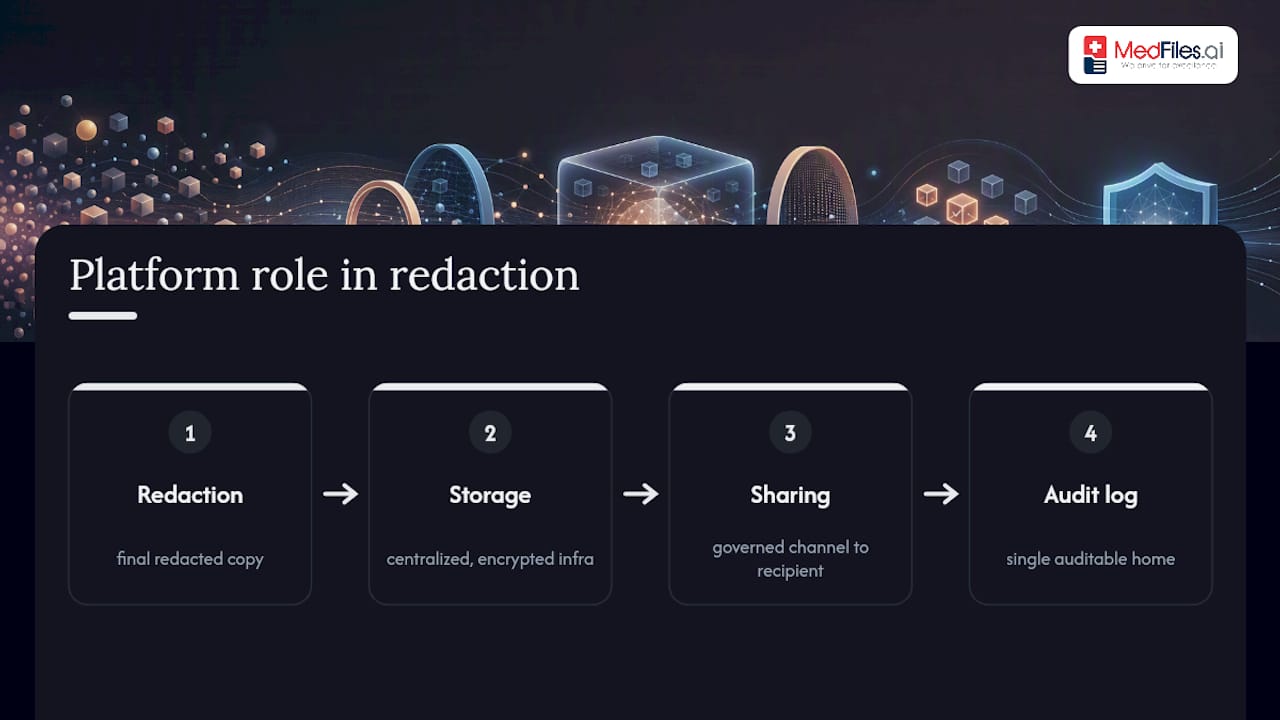
Redaction is only half the job. The other half is what happens to that final redacted copy afterward: where it’s stored, who can retrieve it, and whether you can prove the disclosure later. Medfiles runs on HIPAA-ready infrastructure with end-to-end encryption, and its secure sharing tools let a redacted copy move to a provider or family member through a governed channel instead of an unencrypted email attachment. Centralizing finished redacted documents with controlled clinical access, as described on the provider-facing pages, gives your disclosure log a single, auditable home instead of scattered exports.
Team View: Practical Priorities for HIM Staff Doing Redaction
Automation flags. Humans decide. That’s the whole model, and departments that skip the manual review pass because auto-detection “looked clean” are the ones that end up filing breach reports. Build a five-minute verification gate into every routine release: paste test, name search, metadata check, sign-off. Nothing leaves without it.
If you need one sentence to run the whole department on, it’s this: export only what’s needed, remove identifiers permanently, sanitize metadata, verify, log.
— Team
An Alternative: Centralizing Redaction and Sharing on One Platform
Local redaction tools and cloud vendors both solve the removal step. What most departments still lack is a single place where the finished, redacted copy lives, gets shared under access controls, and generates its own audit trail without a separate system to manage. That’s the gap Medfiles fills.
Instead of emailing a redacted PDF and hoping the recipient handles it responsibly, Medfiles gives you a secure document storage layer built on HIPAA-ready infrastructure, with controlled sharing that logs who accessed what and when. For families and caregivers juggling records across multiple providers, that same audit trail doubles as proof of exactly what was disclosed and to whom, which is precisely what a privacy officer wants to see during a review. For healthcare teams evaluating an enterprise use case, Medfiles’ health app is worth a trial run before your next high-volume release cycle. Start a free trial and see how a governed sharing channel changes your disclosure process.
Sources
Consult HHS’s HIPAA Privacy Rule pages and de-identification guidance for definitive rules. For secure transmission practices, see this guide to sharing records for a second opinion and this overview of HIPAA-compliant web forms.
This article is general information, not a substitute for advice from a qualified doctor. Consult a qualified healthcare professional about your own circumstances before acting on anything here.