Is Email HIPAA Compliant? What Providers Must Verify
Discover how email can be HIPAA compliant for healthcare providers. Learn the essential safeguards to protect patient information effectively.

Is Email HIPAA Compliant? What Providers Must Verify
Yes, email can be used lawfully for protected health information, but only under specific conditions. A covered entity needs a signed Business Associate Agreement with its email vendor, enforced encryption, strict access controls, audit logging, and documented patient preferences. Skip any one of those, and that same email becomes a liability. HHS confirms providers can email patients when appropriate safeguards exist, and patients retain the right to request unsecured email despite the risk.
TL;DR:
- HIPAA permits email for PHI only if strict safeguards like signed BAA, encryption, access controls, and audit logs are in place, as encryption is technically “addressable.”
- Sending PHI depends on content; details in attachments, subject lines, or filenames with identifiers create PHI risks even if the message body is minimal.
- Vendors like Google Workspace and Microsoft 365 can be HIPAA-compliant only when configured properly with a signed BAA and appropriate security measures.
- Patient requests for unsecured email must be documented after risk explanation, verification, and offering secure alternatives, but do not exempt organizations from other safeguards.
- Mis-sent emails are a leading breach cause, requiring prompt containment, scope assessment, proper reporting, and regular staff training for mitigation.
Table of Contents
- What HHS and OCR Actually Say About Email Compliance
- When Does an Email Actually Contain PHI?
- The Safeguards That Actually Make Email Compliant
- Choosing an Email Vendor: What Belongs in the BAA
- Handling Patient Requests for Unencrypted Email
- When PHI Ends Up in the Wrong Inbox
- Practical HIPAA Email Checklist for Your Team
- Why Encryption Should Be Treated as Mandatory, Not Optional
- A Purpose-Built Alternative to Emailing PHI
- Sources
What HHS and OCR Actually Say About Email Compliance
The Office for Civil Rights has never banned email for protected health information. The HHS FAQ on the topic states plainly that covered providers can communicate electronically with patients, including by email, “when appropriate safeguards are applied.” That single sentence carries the entire compliance burden for every healthcare organization sending PHI over the wire.
Two sections of the Code of Federal Regulations do the heavy lifting here. 45 C.F.R. §164.522(b) gives patients the right to request confidential communications, including a preference for unsecured email if they understand and accept the risk. 45 C.F.R. §164.312 covers transmission security, the technical safeguard that governs how PHI moves across networks.
Here’s where administrators get tripped up: §164.312 labels encryption “addressable” rather than “required.” That word does not mean optional. It means a covered entity must either implement encryption or document, in writing, an equally effective alternative, plus the reasoning behind that decision. In practice, OCR’s enforcement posture treats unencrypted PHI transmission as a red flag first and asks for the documented justification second.
What this means operationally:
- Email is permitted, not banned. HIPAA was never designed to force a return to fax machines and phone trees.
- “Addressable” does not mean skippable. Auditors expect a written risk analysis explaining any decision not to encrypt.
- Patient consent under §164.522(b) doesn’t erase your other obligations. Accepting a patient’s request for unsecured email doesn’t excuse you from BAAs or internal access controls on messages you send to other providers.
- OCR enforcement history shows a consistent pattern: organizations get penalized less for the breach itself and more for the absence of a risk analysis that anticipated it.
When Does an Email Actually Contain PHI?
Not every message that mentions a patient triggers HIPAA safeguards, but the threshold is lower than most staff assume. Protected health information exists in an email the moment it combines an identifier (name, date of birth, medical record number, email address) with health-related content (a diagnosis, a lab result, a treatment plan, an appointment reason).
- Full clinical detail. An email reading “Attached are Sarah Kim’s biopsy results from Tuesday” is PHI on its face. Sender, subject, and attachment all need protection.
- Subject-line leakage. A subject line like “Following up on your diabetes medication” exposes health information even if the body is empty, and subject lines routinely travel through preview panes, notification banners, and forwarded threads without anyone noticing.
- Attachments with identifiers. A PDF named “JohnDoe_MRI_Results.pdf” carries PHI in its filename alone, independent of what the email text says.
- De-identified content. A message stripped of all 18 HIPAA identifiers (per the Safe Harbor method) generally falls outside PHI protections, though true de-identification is harder to achieve than most people assume.
- Scheduling without identifiers. “Reminder: your appointment is confirmed for 2:00 PM” sent to a patient’s own inbox with no diagnostic content sits in a gray zone many practices treat conservatively anyway.
- Mass communications. Newsletter-style messages to an entire patient list without individual health details typically avoid PHI status, but a shared “To:” field exposing every recipient’s email address to every other recipient is its own privacy problem, separate from clinical content.
The Safeguards That Actually Make Email Compliant
A BAA is the entry ticket, not the whole game. Any cloud service provider that creates, receives, maintains, or transmits electronic PHI on your behalf qualifies as a business associate under HHS cloud computing guidance, and that status triggers a mandatory, signed BAA before a single message goes out. No BAA means no legal basis for using that vendor with PHI, regardless of how good the encryption looks on paper.

Transmission encryption comes next. TLS 1.2 or higher should be enforced on every outbound and inbound connection, not left as a default that a misconfigured mail server silently drops. TLS protects data in transit between mail servers, but it doesn’t protect the message once it lands in someone’s inbox. For higher-sensitivity communications, many compliance teams layer on S/MIME, PGP, or portal-based delivery, where the recipient clicks a link and authenticates to view the message rather than receiving PHI directly in the email body.
Encryption at rest protects stored messages sitting in mailboxes, archives, and backups. Pair it with access controls: unique logins for every user, role-based access control limiting who can view which mailboxes, and multi-factor authentication on every account that touches PHI. Audit logging closes the loop, recording who accessed what and when, which is often the difference between a contained incident and a six-figure settlement during an OCR investigation.
A few operational controls round out the picture:
- Enforce device management policies covering laptops, phones, and tablets that sync PHI-containing mailboxes.
- Apply minimum-necessary content rules: don’t put full chart notes in an email when a portal link accomplishes the same goal.
- Train the workforce on subject-line hygiene, attachment naming, and the mechanics of forwarding threads that may contain hidden PHI further down the message.
- Review these controls periodically, not once at onboarding and never again.
Pro Tip: Run a test email to yourself with a fake patient name in the subject line, then check whether it shows up in a phone notification banner. If a stranger glancing at your lock screen could read a diagnosis, your staff’s phones need the same encryption policy as your servers.
Choosing an Email Vendor: What Belongs in the BAA
Brand recognition means nothing without the paperwork behind it. Consumer email accounts like free @gmail.com or @outlook.com addresses will not sign a BAA under any circumstance, which makes them categorically unsuitable for PHI, no matter how careful the individual sender is. Google Workspace and Microsoft 365 can be configured for HIPAA compliance, but only on paid business or enterprise tiers, only with a signed BAA in place, and only when an administrator has actually configured the security settings correctly. Buying the right plan and skipping the configuration step is a common and costly mistake.
Before signing anything, confirm the vendor’s BAA explicitly covers the email service you intend to use, not just cloud storage or a different product line in the same suite. Some organizations turn to specialist providers like Paubox, which build HIPAA compliance into the product from the ground up rather than retrofitting it onto a general-purpose platform.
Run through this checklist before committing:
- Does the vendor sign a BAA that names the exact email service, not a vague umbrella agreement?
- Is TLS enforced by default, with no fallback to unencrypted transmission?
- Does the platform offer message-level encryption and data loss prevention (DLP) rules that catch PHI before it leaves the network?
- Are audit logs retained long enough to satisfy a forensic request during an investigation?
- Does the vendor commit, in writing, to breach notification timelines that match your own regulatory deadlines?
Red flags that should end the conversation immediately: refusal to sign a BAA, no audit logging capability, vague answers about incident response, or a sales rep who can’t explain what happens to your data during a subpoena.
Handling Patient Requests for Unencrypted Email
Patients sometimes prefer convenience over security, and HIPAA anticipated that. Under 45 C.F.R. §164.522(b), covered entities must accommodate reasonable requests for confidential communications, including a patient’s choice to receive PHI over unsecured email despite the risk.
- Verify the request came from the patient. Confirm identity through an established channel before honoring any change to communication preferences.
- Explain the risk in plain language. Tell the patient, in writing, that unencrypted email can be intercepted, forwarded, or read by unauthorized parties if their device is compromised.
- Get documented acknowledgement. A signed or electronically confirmed statement showing the patient understood and accepted the risk protects the organization if something goes wrong later.
- Offer the secure alternative first. Present a patient portal or encrypted link as the default, and let the patient actively opt out rather than assuming unsecured email by default.
- Reconfirm periodically. Preferences change, and revisiting the choice annually or after a security incident keeps the documentation current rather than stale.
Document the request directly in the patient’s record, not in a separate email thread that could get lost. That single habit turns a verbal preference into an audit-ready paper trail.
When PHI Ends Up in the Wrong Inbox
Misdirected email ranks among the most common causes of reportable healthcare breaches, and the mechanism is almost always mundane: autocomplete fills in the wrong recipient, a reply-all catches someone who shouldn’t see the thread, or a forwarded chain drags along an attachment nobody remembers is there.
The moment a misdirected email is discovered, the response sequence matters as much as the prevention did:
- Contain first. Ask the vendor to recall or disable the message if the platform supports it, and preserve every relevant log before anything gets overwritten.
- Assess the scope. Determine exactly what PHI was exposed and to whom, since that scope determines your notification obligations.
- Notify affected individuals when the risk assessment shows a reportable breach, following the timelines OCR expects.
- Report to OCR through the breach portal, with large-scale incidents (500 or more individuals) carrying tighter reporting windows than smaller ones.
- Loop in the vendor’s own incident response team, since a business associate’s contractual obligations under the BAA extend to breach cooperation, not just data handling.
Including every PHI-touching mailbox in your Security Risk Analysis, and running periodic mis-sent-email drills, catches these failures before they become six-figure settlements.
Practical HIPAA Email Checklist for Your Team
Turning all of this into a working program doesn’t require a compliance department the size of a hospital system’s. It requires a sequence, followed consistently.
- Inventory every mailbox that touches PHI. You can’t protect what you haven’t identified, and most organizations discover forgotten shared inboxes during this step.
- Run a targeted risk analysis on those mailboxes specifically, not just a generic organization-wide assessment that glosses over email.
- Confirm every BAA is current and specific, naming the exact email service and outlining the vendor’s breach notification responsibilities.
- Enforce TLS across all mail flows, with no silent fallback to plaintext when a receiving server doesn’t support encryption.
- Deploy encryption for attachments, or switch to portal-based delivery for anything containing lab results, imaging, or full clinical notes.
- Turn on MFA and role-based access control for every account with mailbox access, including shared department inboxes.
- Write subject-line and attachment-naming policies that ban identifiers in the subject field and require generic file names for anything sent externally.
- Train staff annually, and run at least one mis-sent-email drill so the response process isn’t being invented during an actual incident.
- Keep audit trails intact and test your incident response plan before you need it for real.
Pro Tip: Start the inventory step this week, even informally. Most breach investigations reveal a mailbox nobody remembered existed, usually a shared front-desk account that three different employees have used for years.
Why Encryption Should Be Treated as Mandatory, Not Optional
The letter of the Security Rule still calls encryption “addressable,” but that technical distinction is losing relevance fast. The 2024 Notice of Proposed Rulemaking signals a regulatory direction that treats encryption as the expected baseline rather than one option among several, and OCR’s enforcement history already reflects that shift in practice.
We think the “addressable” framing has quietly become a trap for organizations that read it too literally. Choosing not to encrypt still requires a documented, defensible alternative, and in our experience reviewing how breaches get investigated, very few organizations have that documentation ready when OCR comes asking. The safer posture, and increasingly the only realistic one, is to encrypt by default and treat any exception as the thing that needs justifying, not the other way around.
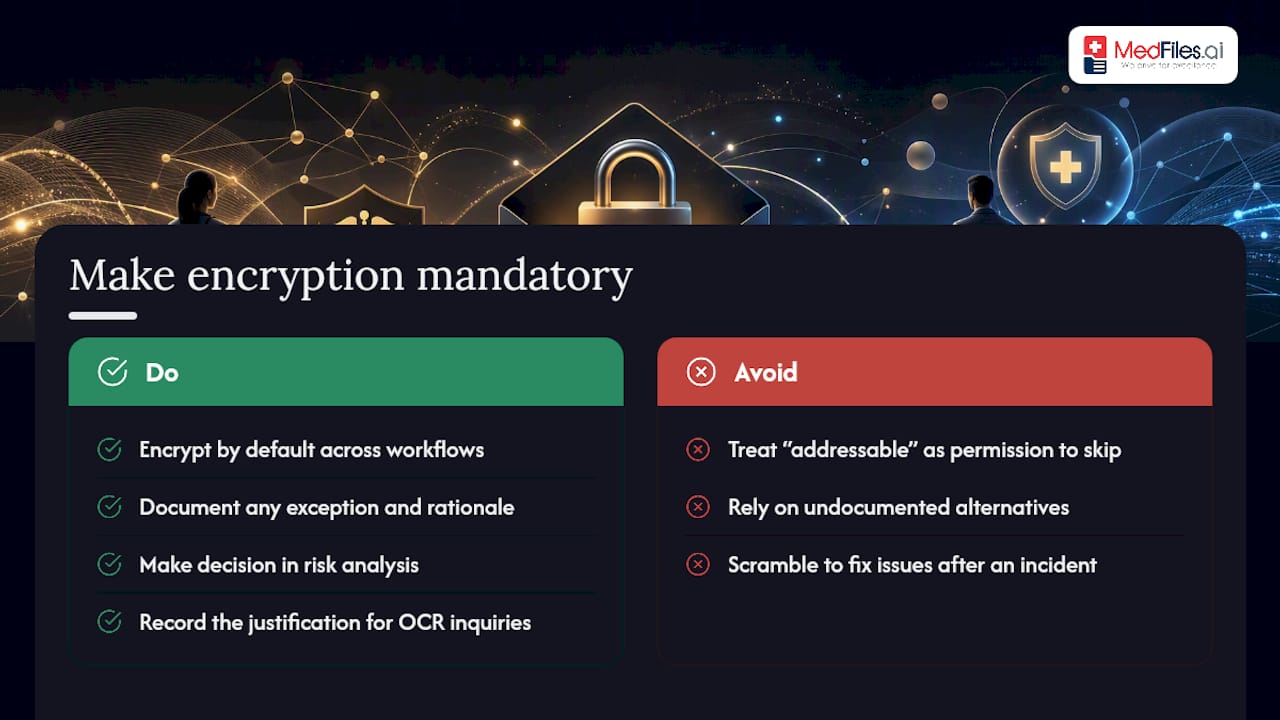
There’s a practical upside to this beyond regulatory optics. Teams that build encryption into their default workflow spend far less time scrambling during an incident, because the technical safeguard that would have prevented the breach was already running before anyone noticed a problem. Encryption stops being a compliance checkbox and starts being the thing that lets your staff move fast without a second thought.
Treat your next risk analysis as the moment to make this decision permanent, then write down why you made it. That single document is worth more during an OCR inquiry than almost anything else in your compliance file.
— Team
A Purpose-Built Alternative to Emailing PHI
Every safeguard covered above, BAAs, encryption, access controls, audit logs, patient consent documentation, exists because standard email was never built with PHI in mind. Medfiles was.
Instead of retrofitting a consumer inbox with encryption add-ons and hoping your staff remembers the subject-line policy, Medfiles gives patients, families, and caregivers a secure document sharing workflow designed around medical records from the start. Every upload sits behind end-to-end encryption, every share generates an audit trail automatically, and there’s no BAA negotiation required on your end because the security architecture is already built into how the platform works. The MedFiles Inbox replaces the “attach and hope” model with a system where lab results, prescriptions, and imaging move between patients and providers without ever depending on whether someone’s email client happened to enforce TLS that day.
For practices and families ready to stop treating email as the default channel for sensitive results, a free trial requires no credit card to get started, giving you a direct look at how the sharing and storage workflow compares to what you’re doing today.
Sources
For the primary legal text, review the HHS FAQ on email and HIPAA and 45 C.F.R. §164.522 on the eCFR site. For practical implementation detail, HIPAA Journal’s email compliance guide and Medcurity’s breach-prevention overview cover vendor configuration and mis-sent email response in more depth, while myGPapp’s analysis of consumer email risk offers a useful outside perspective on why contractual assurances matter as much as technical controls.
This article is general information, not a substitute for advice from a qualified doctor. Consult a qualified healthcare professional about your own circumstances before acting on anything here.