Find Old Immunization Records: State IIS Can Deliver in 3–14 Days
Start with your provider and state IIS to retrieve old vaccine records. Includes verification tips, state processing times, and a scan and upload workflow.

Find Old Immunization Records: State IIS Can Deliver in 3–14 Days
Start with your most recent vaccination provider, then check your state’s Immunization Information System (IIS). There’s no single national vaccine registry, so your search happens state by state and provider by provider. Bring a photo ID to speed up verification. If nothing turns up, don’t panic. Repeating a vaccine is safe and standard practice when records can’t be confirmed.
TL;DR:
- Most immunization records are stored across multiple providers, pharmacies, schools, and military or employer files, so checking each source is essential.
- State Immunization Information Systems vary by state and require exact demographic matches, sometimes including past or alternative names, for successful searches.
- Official records can usually be requested online or by mail with a valid ID, and processing times range from a few days to two weeks depending on the state.
- If records are unavailable, repeating vaccines is safe and recommended, though antibody titers may be useful for some diseases, but are not always reliable.
- After recovery, storing records digitally in encrypted apps and updating state registries ensures long-term access and minimizes the risk of losing essential proof of vaccination.
Table of Contents
- Where to Find Old Immunization Records: Providers, Pharmacies, and Schools
- What Is a State IIS, and How Do You Search It?
- How to Request Official Immunization Records
- What to Do When You Can’t Find Any Records
- Keep This From Happening Again: Storing Your Records for Good
- A Digital Workflow That Keeps This From Happening Twice
- One Family’s Scattered Vaccine Cards, Consolidated
- Store Your Family’s Vaccine Records Once, Access Them Forever
- Sources
Where to Find Old Immunization Records: Providers, Pharmacies, and Schools
Your search should move outward in circles, starting close to home and expanding only when the closest sources come up empty.
Begin with your current or most recent primary care provider or pediatrician. Their office likely already has a record on file, and even if you switched practices years ago, that visit often triggered a records transfer. Next, work backward through travel clinics, urgent care centers, and any local public health clinic you visited for a flu shot or a routine vaccine. Many pharmacies now report vaccinations directly to your state’s registry, so a pharmacist who gave you a shingles or Tdap booster five years ago may have already logged it for you.
Schools, colleges, daycare centers, and summer camps are worth a call too. Enrollment paperwork almost always required proof of immunization, and some institutions keep those forms on file for years, even after a student graduates. Former employers with occupational health requirements, and military personnel records if you served, round out the list of high-yield places to check.
Before you make a single call, gather your legal name at the time of service, date of birth, and every address you’ve lived at since. Vaccination records get filed under the name and address on record that day, not your current one.
- Call your most recent provider or pediatrician first
- Ask pharmacies where you received flu, shingles, or travel vaccines
- Contact schools, camps, or daycare centers for archived forms
- Check former employer occupational health files or military records
- Have your legal name, DOB, and past addresses ready before you call
Pro Tip: If you’ve ever gone by a maiden name, a nickname, or a slightly different spelling, list every version. Registries match on exact demographic data, and a middle initial mismatch can hide a record that’s sitting right there.
What Is a State IIS, and How Do You Search It?
A state Immunization Information System is the electronic backbone most providers and pharmacies already report to, and it’s usually your best shot at a complete history in one place. Every state and territory runs its own IIS, and the CDC maintains a contacts page listing who to reach in each jurisdiction, since there’s no single federal database that consolidates everyone’s shots.
Consumer-facing portals vary by state, but they tend to work the same basic way. Missouri’s ShowMeVax system uses a service called Docket for public access, requiring an exact match on your name and date of birth, plus phone or email verification. Pennsylvania’s PIERS Public Portal lets adults and guardians view, save, and print an official record directly, and it includes an update request form and helpdesk if something is missing. Minnesota runs a similar portal with its own verification steps.
To find yours, search the CDC’s IIS contacts list for your state, then look for a “consumer portal” or “immunization record” link on the state health department site. If the online tool fails to find you, call the helpdesk directly and ask them to search by alternate spellings or a maiden name.
- Search the CDC IIS contacts page for your state’s program
- Look for a consumer portal on your state health department’s site
- Try alternate names, former legal names, or gender markers if the first search fails
- Call the state helpdesk if the portal turns up nothing
How to Request Official Immunization Records
Filing a formal request is straightforward once you know what to have on hand.
- Gather your documents. Most states ask for a state-issued photo ID, a U.S. passport, or proof of guardianship if you’re requesting records for a child or dependent.
- Submit the request. Complete the state’s online form, or call the IIS or your former provider directly, giving your full legal name, date of birth, and past addresses.
- Verify your identity. Expect a phone or email confirmation step, especially on consumer portals with exact-match requirements.
- Receive your record. Most states deliver a PDF you can download instantly or mail a printed copy.
Processing times vary widely by state. Georgia typically returns records in 3 to 5 business days, while Minnesota requests can take up to 14 business days depending on volume.
If your old provider closed or retired, don’t assume the trail is dead. Records often transfer to a medical records custodian, a successor practice, or the state medical board, so ask the state IIS helpdesk who inherited that practice’s files before giving up.
What to Do When You Can’t Find Any Records
Sometimes the paper trail simply ends, and that’s a manageable problem, not a dead one.
The CDC’s guidance is direct on this point: if you can’t document a vaccine, you’re generally treated as susceptible, and repeating the dose is the standard, safe response. There’s no meaningful medical risk to getting a vaccine you may have already had.
Antibody tests, or titers, can sometimes confirm immunity for diseases like measles or hepatitis B, but they’re not perfect. Titers can miss waning immunity even when you were vaccinated, and they’re not available or reliable for every vaccine, so most clinicians reserve them for specific situations rather than a first-line fix.
- Ask your clinician whether repeating the vaccine or ordering a titer makes more sense for your situation
- Bring any paper evidence, even partial, so your provider can document it
- Ask your provider to enter self-reported or paper-confirmed dates into the current IIS
- Understand that schools, employers, and travel requirements typically accept a documented repeat dose the same as an original one
Keep This From Happening Again: Storing Your Records for Good
Once you’ve tracked down a record, don’t let it go missing a second time.
- Scan every document you find. Capture the vaccine name, date given, manufacturer, and provider or clinic name.
- Keep one master digital copy in a secure, encrypted location, plus a printed wallet card for quick access at appointments or travel checkpoints.
- Ask your current provider to enter historical doses into the state IIS once you locate paper records, so the registry finally reflects your full history.
- Back up in more than one place: an encrypted cloud folder, a secure health app, and a physical copy in a safe spot at home.
Pro Tip: Photograph the actual vaccine sticker or lot number, not just the summary page. If a recall or lot investigation ever comes up, that detail matters and paper cards fade or get lost.
A Digital Workflow That Keeps This From Happening Twice
Once you’ve got the PDF from your state IIS or provider, the smart move is uploading it somewhere searchable, not burying it in an email inbox. Look for HIPAA-ready storage, family profile support, and easy sharing with clinicians when you choose a tool.
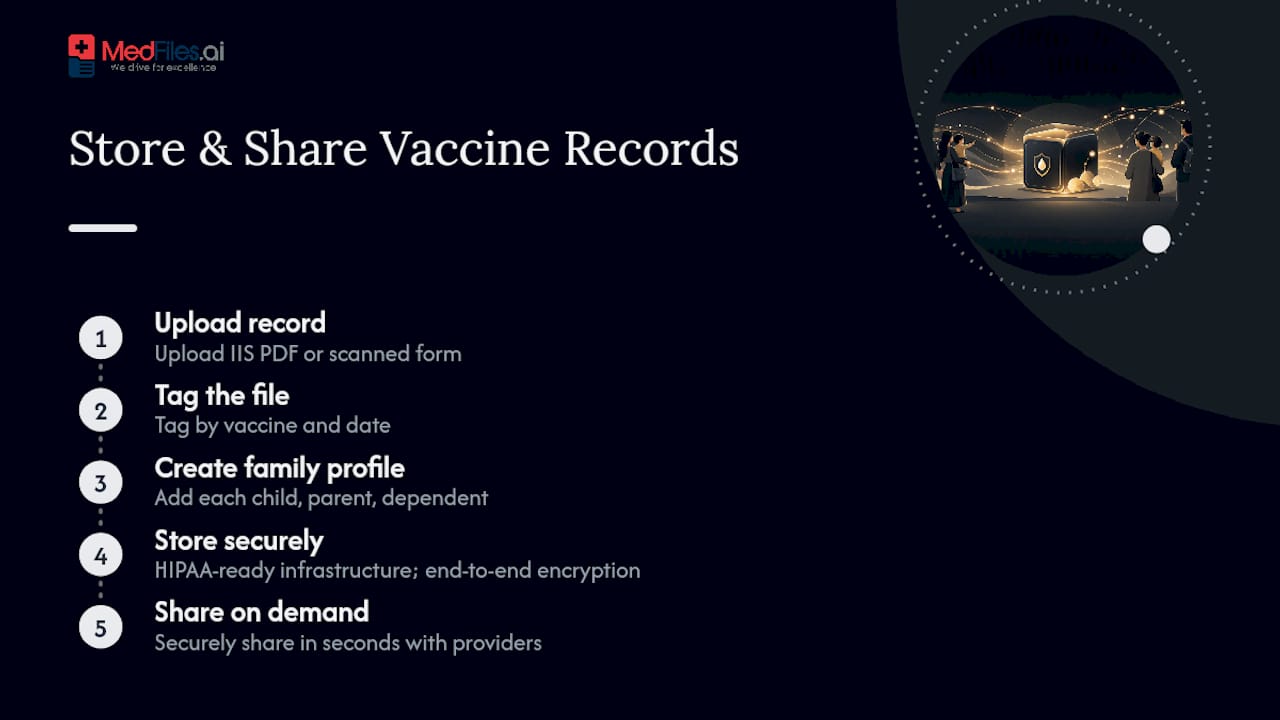
The workflow is simple: download your official IIS record, upload it with the vaccine name, date, and provider tagged as metadata, then share it directly with a new doctor or school. Medfiles builds its platform around exactly this kind of document organization, so the next search takes seconds, not weeks.
One Family’s Scattered Vaccine Cards, Consolidated
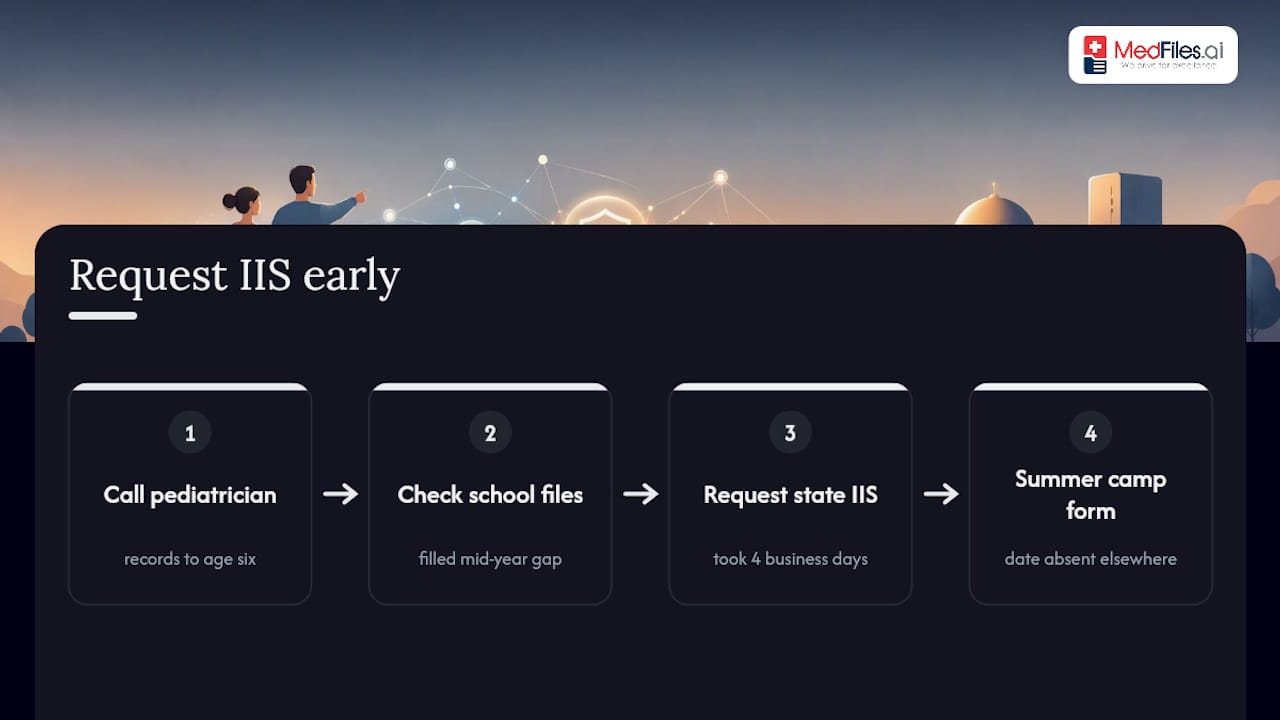
We recently walked a family through this exact process. Calling the pediatrician took one afternoon and produced records back to age six. School enrollment files, dug up by an administrative assistant who remembered the family, filled in a gap from a mid-year transfer. The state IIS request took four business days and closed out the rest. The one surprise: a summer camp form had a vaccine date the pediatrician’s office never had on file.
The lesson that stuck: request the IIS record early, in parallel with your other calls, instead of last. It’s the one source most likely to fill in what everyone else missed.
— Team
Store Your Family’s Vaccine Records Once, Access Them Forever
Once you’ve done the work of tracking down old immunization records, the last thing you want is to lose them again in a drawer or a random email thread. Medfiles gives you a permanent, secure home for every record you recover, whether it’s a downloaded IIS printout or a scanned school form from twenty years ago.
Upload your IIS PDF, tag it by vaccine and date, and set up a family profile for each child, parent, or dependent whose records you’ve tracked down. When a new pediatrician, school, or travel clinic asks for proof, share it securely in seconds instead of calling your old provider’s office all over again. Medfiles runs on HIPAA-ready infrastructure with end-to-end encryption, so the record stays private and accessible only to the people you choose.
Start your free trial today and upload the first record you found this week, before it ends up buried again.
Sources
Start with the CDC’s IIS contacts page to find your state’s registry program. Pennsylvania residents can use the PIERS Public Portal to view and print records directly. For general preventive care documentation after you’ve located your history, this preventive care guide covers what to bring to your next checkup.
This article is general information, not a substitute for advice from a qualified doctor. Consult a qualified healthcare professional about your own circumstances before acting on anything here.
- Keeping vaccine records up to date | CDC
- Georgia
- Tips for locating, maintaining and storing immunization records | Missouri Department of Health and Senior Services
- PIERS Public Portal | Department of Health | Commonwealth of Pennsylvania
- Locate your immunization record | North Carolina DHHS