Set Up Caregiver Access to Medical Records in 5 Steps
Follow a practical 5-step checklist to grant, secure, and test caregiver access, organize records for multiple caregivers, and run a quick platform...
Set Up Caregiver Access to Medical Records in 5 Steps
Yes, a caregiver can access a loved one’s medical records, and it starts with patient-granted permissions inside a personal health record platform. You control who sees what, for how long, and at what level. Secure platforms enforce this with role-based permissions, expiration and revocation controls, and audit trails, so nothing is shared blindly. Medfiles is one HIPAA-ready example built for exactly this: selective sharing, multi-profile management, and a permission structure designed for real families.
TL;DR:
- Caregivers should be granted permission levels based on their role, with view-only for emergencies, annotation for symptom tracking, and full edit access reserved for primary caregivers.
- Use time-limited and scope-specific sharing, especially for short-term or emergency tasks, to reduce security risks and avoid unnecessary exposure of health data.
- Always test the entire access and revocation process beforehand to ensure security controls function correctly and maintain logs of all access events regularly.
- Avoid sharing passwords by creating individual logins, enable multi-factor authentication, and choose platforms with end-to-end encryption and HIPAA compliance.
- Organize records with consistent naming, tagging, and a shared change log to streamline multi-caregiver access and prevent version confusion during hand-offs.
Table of Contents
- Who Needs Caregiver Access to Medical Records, and When
- How Do You Set Up Caregiver Access Step by Step?
- What Do Permission Levels and Sharing Controls Actually Mean?
- Security Best Practices Every Caregiver Should Follow
- How Should You Organize Records for Multiple Caregivers?
- Sharing Records With Clinicians During an Emergency
- Why Platform Trust Signals Matter for Caregiver Access
- What Mistakes Do Caregivers Make Most Often?
- Try Caregiver Access With Medfiles Today
- Sources
Who Needs Caregiver Access to Medical Records, and When
Not every family member needs the same level of access. A primary caregiver (usually a spouse, adult child, or the person handling day-to-day appointments) needs ongoing access to manage medications, book visits, and track lab results. Secondary caregivers, like a sibling who helps occasionally, often only need temporary or scoped access. Emergency contacts need almost nothing until they need everything.
Grant ongoing access for daily management tasks. Use time-limited access for specific situations instead:
- A sibling covering care during your travel
- A rehab facility staff member after surgery
- A visiting nurse handling a short-term recovery plan
- A new specialist who only needs one set of records
Tasks like refilling prescriptions or forwarding lab results to a new doctor almost always justify granting access. One-time errands usually don’t.
How Do You Set Up Caregiver Access Step by Step?
Setting up access takes minutes, not hours, once your documents are already stored.
Before you invite anyone, gather the caregiver’s contact information and decide which documents matter most right now. Medication list and allergy records usually come first. According to feasibility research on caregiver-focused personal health records, getting provider buy-in early speeds up how fast a record set becomes useful, so request electronic copies from your doctor’s office whenever you can instead of scanning paper.
Here’s the invite flow:
- Add the caregiver’s email or phone number to your account.
- Select a permission tier: view-only, annotate, or full edit and share.
- Turn on identity verification if the platform offers it, especially for edit access.
- Set an expiration date if the access is temporary.
- Send the invite and confirm the caregiver can log in.
After the invite goes out, test it yourself. Log in as the caregiver would (or ask them to walk you through what they see) and confirm they can reach the documents you intended, and nothing else. Keep a short note of who has access and why. Set a calendar reminder every three months to review the list and remove anyone who no longer needs it.
Pro Tip: Test the entire invite and revocation cycle with a trusted second account before you add a real caregiver. Confirm the expiration date actually cuts off access and that the action shows up in your audit log. Five minutes of testing now saves a security headache later.
What Do Permission Levels and Sharing Controls Actually Mean?
Permission tiers aren’t just labels. They determine exactly what a caregiver can touch.
- View-only lets someone see documents without changing anything. Best for emergency contacts or secondary caregivers.
- Annotate allows notes or flags on a document without altering the original file. Useful for a caregiver tracking symptoms alongside a lab report.
- Edit and share gives full control, including the ability to upload new documents or forward them to a provider. Reserve this for your primary caregiver.
Scope matters as much as tier. Sharing one lab result is safer than sharing an entire profile, and it’s usually all a provider needs. A survey on consumer health app misconceptions found many people assume every health app falls under HIPAA protection, when most consumer apps don’t. That’s exactly why scope-limited, expiring shares matter more than blanket access.
Check your access history regularly. Most platforms with role-based permissions log every view, edit, and share, so an unfamiliar entry is easy to spot before it becomes a problem.
Security Best Practices Every Caregiver Should Follow
The biggest risk in caregiver access isn’t the platform. It’s shortcuts.
- Never share a password. Give each caregiver their own login instead. A study on PHR-style tools found that consolidating records into one accessible system, rather than swapping logins, actually reduces caregiver burden by cutting down on duplicate effort and confusion.
- Turn on multi-factor authentication (MFA) for every account with access, not just the primary one.
- Skip SMS and email for anything sensitive. Caregiver cybersecurity guidance recommends encrypted archives and secure, authenticated links over plain text messages, which can be intercepted or forwarded without your knowledge.
- Choose platforms with end-to-end encryption and HIPAA-ready infrastructure, not just a privacy policy that sounds reassuring.
Pro Tip: If a caregiver ever texts you “just send me the PDF,” resist it. Send a secure, expiring link instead. It takes the same ten seconds and closes a door that’s easy to forget about later.
How Should You Organize Records for Multiple Caregivers?
Confusion during a hand-off usually comes down to messy files, not bad intentions.
Prioritize these documents first: medication list, allergy record, advance directive, recent labs and imaging, and insurance card scans. Everything else can wait.
Use a predictable naming pattern so anyone can find a file fast, something like lab_HbA1c_20260401_v1.pdf. Keep a one-line shared change log with the date, file name, what changed, and who made the edit. This solves the versioning headache that trips up most multi-caregiver setups.
- Tag documents by condition (diabetes, cardiac, orthopedic).
- Tag by provider so records from the same specialist stay grouped.
- Tag by date range for anything tracking a trend, like blood pressure logs.
A personal health record overview from Mayo Clinic recommends keeping documents in one accessible place specifically so they can be shared with family and providers without a scramble.
Sharing Records With Clinicians During an Emergency
An emergency is the worst time to hunt for files. Build an export-ready emergency packet now: medication list, allergies, recent labs, and an advance directive, all in one folder you can share in seconds.
When a clinician needs records, a secure link or direct provider upload beats emailing a stack of PDFs. Sharing specific documents rather than a full profile, an approach some family record platforms recommend, keeps the exchange fast and limits what a stranger’s inbox ever sees. Test this process before you need it, and keep clinician contact details current.
| Emergency prep step | Why it matters |
|---|---|
| Build a packet: meds, allergies, labs, directive | Ready to share in seconds, not minutes |
| Use secure link or provider upload | Limits exposure versus email |
| Test the share process in advance | Confirms it works before a crisis |
| Keep clinician contacts current | Avoids delays finding the right recipient |
Why Platform Trust Signals Matter for Caregiver Access
Not every health app deserves your family’s trust. Look for HIPAA-ready infrastructure, end-to-end encryption, automatic document organization, and audit logs that show exactly who accessed what and when. Medfiles builds around these signals directly, pairing role-based permissions with multi-profile management so a family managing several people’s records doesn’t end up juggling accounts.
Audit logs and clear permission tiers solve the most common caregiver complaint: not knowing who has access or whether an old link still works. Before trusting any platform, run a trial invite yourself. Confirm the audit entry appears, then test that revoking access actually removes it.
What Mistakes Do Caregivers Make Most Often?
The same handful of mistakes show up again and again, and they’re almost always fixable in minutes.
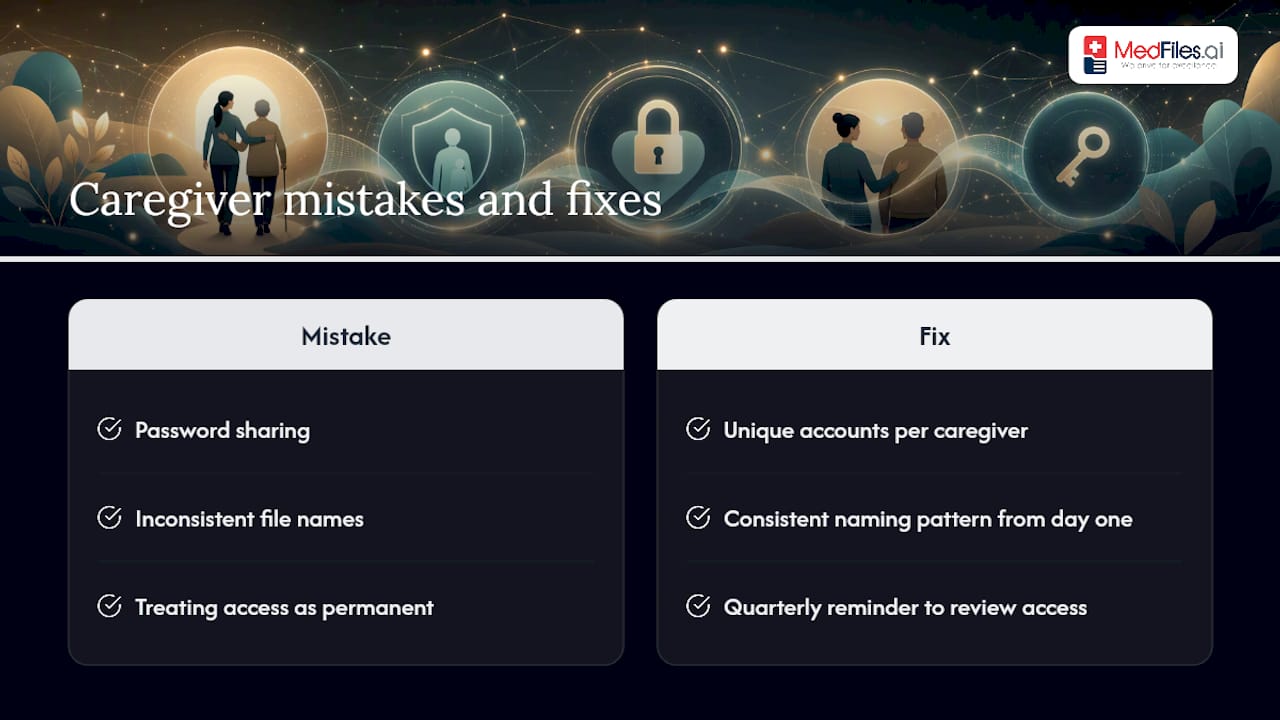
Password sharing tops the list. It feels convenient until you can’t tell which family member changed a document. Inconsistent file names come next. Naming a file “labs2.pdf” today and “newlabs.pdf” next month guarantees confusion during a hand-off. The third common mistake is treating access as permanent. Permissions granted for a hospital stay quietly outlive their purpose because nobody set a review date.
The fixes are simple: unique accounts for every caregiver, a consistent naming pattern from day one, and a quarterly reminder to review who still needs access. None of this requires technical skill. It requires a habit.
— Team
Try Caregiver Access With Medfiles Today
Medfiles was built around the exact checklist this article just walked through: HIPAA-ready infrastructure, end-to-end encryption, selective sharing, multi-profile management, and audit logs that show every access event in plain language.
Setting up caregiver access shouldn’t require a technical background or a leap of faith. With Medfiles, you invite a caregiver, choose their permission tier, set an expiration if needed, and confirm it works, all from one dashboard. Families managing multiple profiles, whether that’s aging parents, kids, or even pets, can keep every record organized without duplicating logins or losing track of who has access to what.
Start with a free trial and test the invite flow with a trusted secondary account before you add a real caregiver. If you want to see the security details first, review how end-to-end encryption and HIPAA-ready controls work, or check out multi-profile management for families if you’re coordinating care for more than one person. For a deeper technical look at identity verification and delegated permissions in interoperable systems, this healthcare data privacy guide is worth a read.
Sources
- Caregiver burden / PHR research (PMC6229518)
- Feasibility and Utility of a Personal Health Record for Persons With Dementia and Their Family Caregivers (PMC7381256)
- Personal health record overview (Mayo Clinic)