Stop Missing Vaccines and Screens: Family Care Gap Tracking in 20 Minutes
Set up family care gap tracking in about 20 minutes. Track five high-value preventive items, verify records with clinicians, and protect your family’s...

Stop Missing Vaccines and Screens: Family Care Gap Tracking in 20 Minutes
Care gap tracking inside a personal health record flags the preventive services you or a dependent missed, whether that’s a childhood vaccine, a mammogram, or an annual A1c check, and turns each one into a scheduled, documented action. You see exactly what’s due, overdue, or up to date. Then you book it, prove it happened, and the gap closes. Platforms can build this directly into HIPAA-ready family records.
TL;DR:
- Care-gap tracking relies on accurate, verified data from electronic records, uploaded documents, or manual entries, which are essential for reliable flagging.
- Focusing initially on childhood immunizations, age-based cancer screenings, and routine labs ensures high-value preventive care without overwhelming users.
- Regular monthly or quarterly reviews and designating a family member as a maintenance owner improve record accuracy and prevent overlooked gaps.
- Turning flagged gaps into scheduled services requires immediate action, proof uploads, and confirmation of record updates in clinician systems.
- Care-gap trackers excel at scheduled screenings but are less effective at motivating lifestyle changes or handling unverified, external, or conflicting health data.
Table of Contents
- How Does Care-Gap Tracking Actually Work?
- What Should You Track First?
- Setting Up Care-Gap Tracking for Your Family
- From Flagged Gap to Closed Gap: The Action Playbook
- Where Care-Gap Tracking Falls Short
- Our Take on Making This Actually Work for Families
- Start Tracking and Closing Gaps With MedFiles.ai
- Sources
How Does Care-Gap Tracking Actually Work?
A care-gap tracker runs on rules, not guesswork. It maps standard preventive guidelines against each person’s age, sex, and health history, then checks that against the last recorded date for a given service. Miss a window and it flags the item as due or overdue.
The accuracy depends entirely on what feeds the system. Data can come from three places:
- EHR sync — a direct feed from your clinic’s electronic record, when available.
- Uploaded documents — scanned lab reports, vaccine cards, or screening results you add yourself.
- Manual entry — dates you type in when no document exists yet.
Uploaded and manual entries need verification, because a tracker can only be as reliable as the dates behind it. A well-built interactive preventive health record translates that raw data into plain language and a specific recommendation, not just a red flag. The best systems close the loop with clinicians too: patient-entered updates get sent to the practice, and in one trial, practices corrected their own records for a majority of patients after reviewing an IPHR summary, which triggered outreach to actually schedule the missing service.
What Should You Track First?
Trying to track every possible preventive item on day one is a mistake. Experts recommend starting with a short, focused list of high-value items, then expanding once the habit sticks. Here’s a practical starting order:
- Childhood immunizations — DTaP, MMR, polio, and catch-up doses for kids and teens.
- Age-based cancer screenings — mammograms, colorectal screening, and cervical cancer checks on their recommended intervals.
- Routine labs — cholesterol panels and A1c for anyone with risk factors or a family history.
- Adult vaccinations — annual flu shots, Tdap boosters, and pneumococcal vaccines for eligible ages.
- Annual wellness visits — the checkup that often catches everything else falling behind.
For each entry, capture three things: the date the service happened, the provider or facility name, and a copy of the report or record. That combination is what lets a clinician verify the entry later instead of just taking your word for it. Skip the temptation to log every historical detail at once. A record with five accurate items beats one with twenty unverified guesses.
Setting Up Care-Gap Tracking for Your Family
Getting this right takes about twenty minutes upfront, then just a few minutes a month.
- Create a profile for each person. Enter date of birth, sex, and any major health history (chronic conditions, family history of cancer or heart disease) that changes which screenings apply.
- Import what you already have. Scan vaccine cards, lab reports, and screening results. Tag each file with a service date and provider name so the record stays searchable.
- Turn on personalized recommendations. Age and sex-based rules generate a due list automatically once profiles are complete.
- Choose how you want reminders delivered. Email, app notification, or text, whatever you’ll actually check.
- Verify with a clinician at your next visit. Bring the living record with you and ask the office to reconcile it against their own chart.
Pro Tip: Name every uploaded file the same way, something like “2026-03-15_mammogram_report_ProviderName.pdf.” Consistent naming and tagging by date and service makes it far easier for the tracker’s rule engine to catch a gap correctly, and it saves you from digging through a folder of “scan001.pdf” files later.
Set a recurring check, monthly for anyone with an active health issue, quarterly for a generally healthy family. A five-minute review each month is what keeps a personal health record accurate instead of stale. One overlooked but effective habit: designate a single family member as the record’s maintenance owner. Diffused responsibility is how gaps sit unnoticed for years.
From Flagged Gap to Closed Gap: The Action Playbook
A flagged gap only matters if it turns into a completed, documented service. Here’s how to move it through that pipeline.
- Turn the flag into a booking. Call or message your provider with something direct: “My record shows I’m overdue for a colorectal screening based on my age. Can we schedule that?” Have your insurance information and the last screening date ready.
- Know your options for where to get it done. A primary care clinic, a retail pharmacy for vaccinations, or a community health center can often complete routine screenings and shots faster than waiting for a specialist referral.
- Attach proof once it’s done. Upload the visit summary, lab result, or vaccination record directly to that person’s profile.
- Confirm the clinician’s system reflects it too. Ask the office to update your electronic record, not just your personal file, so the gap reads as closed the next time anyone, including you, checks.
- Set the next reminder immediately. A mammogram closed today needs a new due date logged for one to two years out, depending on the guideline. Don’t let a closed gap quietly become a future one.
Pro Tip: If your visit generates a referral, log the referring provider’s name and the referral date in the same entry. It’s a small habit that prevents a lot of “wait, who did we see for this?” moments six months later.
Where Care-Gap Tracking Falls Short
A tracker is genuinely good at scheduled, guideline-driven services: vaccines, screenings, routine labs. It’s far less effective at driving behavior change. AHRQ’s own research notes that technology helps with scheduled items, but sustained lifestyle changes, diet, exercise, smoking cessation, need human coaching alongside any app.
Data quality is the other real limitation. A few common failure points:
- Missing external records. A screening done at an out-of-network clinic won’t show up unless someone uploads it.
- Mismatched EHR data. Names, dates, or service codes that don’t line up between your personal record and your clinic’s chart can create false gaps or hide real ones.
- Unverified manual entries. Anything typed in from memory should be treated as provisional until a report or clinician confirms it.
The World Health Organization’s review of home-based records also flags confidentiality risk as a design concern, not an afterthought. Protect your family’s record with a few concrete habits: grant caregiver access on a least-privilege basis (only what a specific caregiver needs to help), rely on end-to-end encryption, and avoid recording sensitive details in any shared or public-facing note. Complex medical histories, multiple chronic conditions, or conflicting provider records are exactly the cases where you escalate to a clinician rather than trusting the tracker’s flag alone.
Our Take on Making This Actually Work for Families
Most of the friction with care-gap tracking has nothing to do with the technology and everything to do with follow-through. A tracker can flag that a mammogram is six months overdue. It cannot make the phone call. That gap between “flagged” and “scheduled” is where most families lose momentum, and it’s why we think the maintenance-owner habit matters more than any feature list.
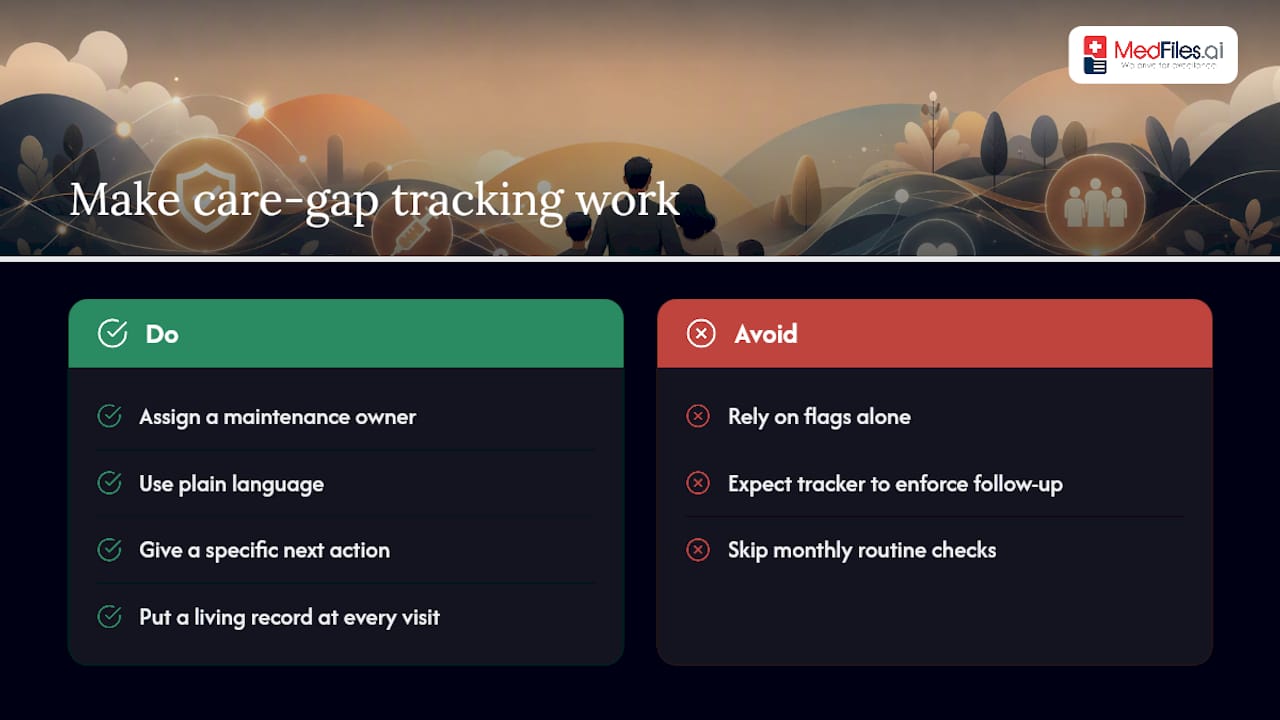
The evidence backs a specific kind of design: one that speaks plainly, gives a specific next action, and puts a living record in front of a clinician at every visit, exactly what the AHRQ implementation handbook found separates records that get used from ones that get ignored. A multi-profile structure is useful because families don’t manage one health history, they manage several, often for people who can’t manage their own (kids, aging parents, pets). A caregiver checking four due lists needs the same clarity a single adult needs checking one.
Where we’d push back on the conventional pitch: don’t expect a tracker to fix inconsistent follow-up on its own. Build the monthly check into your routine the same way you’d build in a bill payment. The record only works as well as the habit around it.
— Team
Start Tracking and Closing Gaps With MedFiles.ai
Some platforms provide one place to run everything covered above: secure document uploads for vaccine cards and lab reports, personalized due-date tracking by age and sex, caregiver access for each family profile, and clinician-ready summaries you can bring to any visit.
Getting started takes three steps. Sign up and create a profile for yourself and each dependent, including pets if that applies to your household. Upload what records you already have and let the platform flag your first set of due items. Then schedule one verification visit with a clinician to reconcile the record against their chart, the same step that drove real EHR corrections in AHRQ’s own trial data. From there, monthly maintenance keeps everything current.
If you’re managing records for aging parents or multiple kids, the family medical records setup keeps every profile separate but accessible from one login. And because strong onboarding is what actually gets people using health tech instead of abandoning it after week one, Some platforms walk you through profile setup rather than dropping you into a blank dashboard.
Medfiles and turn your family’s next overdue screening into a scheduled appointment today.
This article is general information, not a substitute for advice from a qualified doctor. Consult a qualified healthcare professional about your own circumstances before acting on anything here.